Translate

Tuesday, July 25, 2023

The Feasibility of Learning Ruby as Your First Programming Language


Ruby as Your First Programming Language


Choosing the right programming language for beginners is crucial as it sets the foundation for a successful journey in the world of coding. Ruby, a powerful and user-friendly language, has gained popularity for its simplicity and versatility. In this article, we'll explore the feasibility of learning Ruby as the first programming language and discuss the benefits it offers to aspiring developers.


Beginner-Friendly Syntax

Ruby boasts an elegant and human-readable syntax, making it an excellent choice for beginners. Its code is concise and easy to understand, allowing novices to quickly grasp fundamental programming concepts. The language is designed to prioritize developer happiness, reducing the barriers to entry for newcomers and promoting an enjoyable learning experience.


Abundance of Learning Resources

As one of the most widely used programming languages, Ruby has a wealth of learning resources available online. From comprehensive tutorials to interactive coding platforms, beginners can find ample support to kick-start their programming journey. Moreover, the Ruby community is known for its friendliness and willingness to help, making it an inclusive environment for learners.


Versatility and Popularity

Ruby's versatility is another reason why it is a feasible first programming language. It is used extensively for web development, with the popular Ruby on Rails framework providing a robust platform to build web applications. Additionally, Ruby is employed in automation scripts, data analysis, and game development, showcasing its wide-ranging capabilities.


Encourages Clean Code Practices

Ruby's philosophy emphasizes clean and readable code. As beginners learn Ruby, they naturally adopt best coding practices, fostering good habits from the start. This focus on readability not only helps newcomers understand code more easily but also promotes teamwork and maintainability in larger projects.


Rapid Prototyping and Development

For beginners aiming to see tangible results quickly, Ruby excels at rapid prototyping and development. Its dynamic nature allows for swift iteration, enabling developers to experiment and see their ideas come to life without being bogged down by overly complex syntax or rigid structures.


Community and Job Opportunities

Choosing a popular programming language like Ruby means becoming part of a large and thriving community. This opens doors to numerous job opportunities and networking possibilities, both locally and globally. Many startups and established companies value Ruby skills, making it a viable language for career growth.


Transferable Skills

Learning Ruby doesn't just confine beginners to one language; it equips them with transferable skills applicable to other languages and paradigms. The core programming concepts acquired through Ruby can be easily translated to other languages like Python, JavaScript, or Java, providing a solid foundation for future learning.


In conclusion, learning Ruby as the first programming language is indeed feasible and can be a wise choice for beginners. Its beginner-friendly syntax, abundant learning resources, versatility, and emphasis on clean code practices make it an excellent language to start your coding journey. Additionally, the supportive Ruby community and job opportunities further solidify its appeal. Aspiring developers who choose Ruby will not only gain proficiency in this dynamic language but also build the necessary skills to succeed in the ever-evolving world of programming.



Friday, March 10, 2023

Selenium doesn't work with Bootstrap 5: Cannot click on button


Selenium test code with Bootstrap 5


Bootstrap 5, a powerful CSS framework, brings new challenges. One issue developers face is Selenium test failures due to Bootstrap 5's smooth scrolling feature. In this article, we'll explore this problem and provide solutions.

 Recently, I encountered some unexpected test suite failures while using Bootstrap 5. Upon closer inspection, I noticed that the test cases were randomly failing, particularly when interacting with the save button as it will not submit the form. An intriguing puzzle, isn't it?

To address the perplexing test failures, I embarked on an extensive debugging process and conducted thorough research. Eventually, I uncovered the root cause of the issue: a conflict between Bootstrap 5 and Selenium. Specifically, a particular CSS element was causing the problem.


 scroll-behavior: smooth;


This does not allow Selenium to automatically scroll down and click on the element that is at the bottom of the page, I mean an element that is outside window.


How to fix it?


I found 2 ways to fix this kind of flaky tests. I tested them and they actually works. 😊


1. Disable smooth scrolling from bootstrap.

 Note: if you are using rails it should be in: _bootstrap-custom.scss


 $enable-smooth-scroll: false;

2.  Override bootstrap scroll-behavior.


 html {
    scroll-behavior: auto !important;
}


2.1 if you're using rails, you can actually do this just for the test environment:


 html[data-environment="test"] {
    scroll-behavior: auto !important;
}


and in your haml file you should have something like this:


%html{"data-environment": "#{Rails.env}"}


Thursday, August 4, 2022

List of Ubuntu releases with corresponding Linux kernel version


Ubuntu kernel


This is the list of Ubuntu versions with their corresponding Kernel version:

Version / code nameKernel
22.04 Jammy Jellyfish5.15
21.10 Impish Indri5.13
21.04 Hirsute Hippo5.11
20.10 Groovy Gorilla5.8
20.04 Focal Fossa5.4
19.10 Eoan Ermine5.3
19.04 Disco Dingo5
18.10 Cosmic Cuttlefish4.18
18.04 Bionic Beaver4.15
17.10 Artful Aardvark4.13
17.04 Zesty Zapus4.1
16.10 Yakkety Yak4.8
16.04 Xenial Xerus4.4
15.10 Wily Werewolf4.2
15.04 Vivid Vervet3.19
14.10 Utopic Unicorn3.16
14.04 Trusty Tahr3.13
13.10 Saucy Salamander3.11
13.04 Raring Ringtail3.8
12.10 Quantal Quetzal3.5
12.04 Precise Pangolin3.2+
11.10 Oneiric Ocelot3.0
11.04 Natty Narwhal2.6.38
10.10 Maverick Meerkat2.6.35
10.04 Lucid Lynx2.6.32
09.10 Karmic Koala2.6.31
09.04 Jaunty Jackalope2.6.28
08.10 Intrepid Ibex2.6.27
08.04 Hardy Heron2.6.24
07.10 Gutsy Gibbon2.6.22
07.04 Feisty Fawn2.6.20
06.10 Edgy Eft2.6.17
06.06 Dapper Drake2.6.15
05.10 Breezy Badger2.6.12
05.04 Hoary Hedgehog2.6.10
04.10 Warty Warthog2.6.8

Wednesday, May 25, 2022

Mysql Error: Illegal mix of collations


Sometimes, when designing queries, we assume that the database and tables inherit the same general settings. Due to this assumption, we run into many different MYSQL errors.

In this post, I will give you some tips to resolve this specific MYSQL error.

Basically, what it means is that you're trying to compare 2 fields with an incompatible collation.


For example,  if you want to run this query:


 SELECT* FROM table_1 WHERE A in (SELECT B FROM table_2)


But keep in mind that column A has utf8_unicode_ci as default collation, and column B has latin1_general_ci as default collation. So, if you run that query, you will get this error: 


 Illegal mix of collations (utf8_unicode_ci,IMPLICIT) and (latin1_general_ci,IMPLICIT)


How can I make it work?

Well, it's very simple. You can use COLLATE to convert a field to  the desired collation.

Example: 

SELECT* FROM table_1 WHERE A in (SELECT B COLLATE utf8_unicode_ci FROM table_2)


Or


SELECT* FROM table_1 WHERE A COLLATE latin1_general_ci in (SELECT B FROM table_2)


Both queries will work fine now.


I hope you find it useful. Until the next post!!!


Wednesday, March 23, 2022

Configuring Capistrano to run migrations on multiple servers


A few months ago I found myself in a situation where I had to run the migrations on a second server. After some research, I learned that Capistrano only runs migrations on the first server in the :db group, so other servers with :db will be ignored.


I was very surprised!!!

I kept looking into this and finally found the option I was looking for:


This is an example of the config/deploy/production.rb

 server 'sample-web-server1', user: 'deploy', roles: %w{app web db}
 server 'sample-web-server2', user: 'deploy', roles: %w{app web}
server 'sample-web-server3', user: 'deploy', roles: %w{app web db}

Now in your config/deploy.rb file add this option:

 set :migration_servers, -> { release_roles(fetch(:migration_role)) }

Now, you just have to deploy.


As a side note:

According to the capistrano changelogs, this option was introduced from version 1.1.7, so if you have capistrano 1.1.7 onwards, you can safely use it. 

You can also check the capistrano documentation here


Wednesday, March 16, 2022

Useful Mysql Queries


There are some situations where your application could crash and sometimes the problem is not really in the source code, but in the database. e.g: you are using wrong collation for a specific table or column or maybe you are using wrong data type etc.

These Mysql statements can help you debug or better understand your current database structure.


Let's begin:


1.  Show all columns for a specific table:


 SHOW COLUMNS FROM users;


output:


and also you can filter by field or type etc.

 SHOW COLUMNS FROM users WHERE field = 'email';


2. Show table details:


 SHOW TABLE STATUS;


output:


and of course you can filter by table name:


 SHOW TABLE STATUS where name = 'users';


Output:


3. Show Mysql variables:


 SHOW variables;


output:


and also you filter by variable name:


 SHOW variables WHERE Variable_name =  'max_allowed_packet';


4. Show Table size:


 SELECT TABLE_NAME AS `users`, ROUND((DATA_LENGTH + INDEX_LENGTH) / 1024 / 1024) AS `Size (MB)` FROM information_schema.TABLES WHERE TABLE_NAME = "users" AND TABLE_SCHEMA = 'my_blog'


Output:


More are coming soon..


Monday, July 8, 2019

Ubuntu: How to install an old Firefox version


If you want to install an old version of Firefox, you just have to follow these steps:

In this case, I had Firefox 4.5.0 and now I want to install Firefox 47.0.1


First, open your terminal


  1. Download firefox 47.0.1

    wget https://ftp.mozilla.org/pub/firefox/releases/47.0.1/linux-x86_64/en-US/firefox-47.0.1.tar.bz2
  2. Unzip Firefox

    tar -xjvf firefox-47.0.1.tar.bz2
  3. We remove the old version

    sudo rm -rf /opt/firefox*
  4. we move the unzip firefox 47.0.1 to the firefox folder

    sudo mv firefox /opt/firefox
  5. create symbolic link

    sudo ln -sf /opt/firefox/firefox /usr/bin/firefox

Wednesday, April 4, 2018

How to edit a commit message


what you need to do is go to your repository  and type this in your command line:


  git commit --amend


Then in your text editor you can put the new commit message.

Good Luck And Happy Hacking!!!

Tuesday, March 13, 2018

Git push force


Sometimes, it is  necessary to performed a push force in our repositories, but you need to be really careful because this action will overwrite all, so you need to know what you are doing.

This is the code:

git push -f <remote> <branch>

e.g
git push -f origin my_new_feature

Wednesday, June 21, 2017

Jquery DatePicker - How to Reset Date


Sometimes,  when you are working with jquery hiding elements or showing some elements, you might need to reset Datepicker to avoid sending a wrong date.


This code will allow you to reset the date by setting a null value in the date selector


var my_date = $('#my_birthday').datepicker();
$('#btn-clear-date').on('click', function () { my_date.datepicker('setDate', null);
});

Monday, December 26, 2016

MYSQL How to prepend a string when updating a column


In order to prepend a string when you are updating a columns is kind of easy, you only need to know the right Mysqsl function to achieve that.

Example:

For any reason, someone requested you to update the user user_login for the user ID:999  with this symbol "@" prefix to each name:


update users 
set user_login = concat('@', user_login)
where id = 999;


As you can see the function "concat" is prepending the @ to each user login.

The expected output would be


ID user_login
999 @john.doe


It is important to note that Concat allows you to add a string either at the end or at the beginning.


Tuesday, November 1, 2016

Ruby on Rails: How to upgrade bundler


To upgrade bundler, just type this command in to  the command line:
gem install bundler

To check if it was upgraded , just display the new version by typing the following command:

bundle --version

Friday, September 2, 2016

Rails - How to enable asset pipeline in development


Sometimes, for debugging purpose, it can be quite helpful to enable the Rails assets pipeline in development model.


to do this, go to config/enviroments/development.rb and add the following configuration:

config.assets.debug = false
config.assets.compile = false
config.assets.digest = true

An important thing to keep in mind is be sure  to have  config.assets.debug = true (the default setting) is disabled.

Finally, you only need to restart your server and then run:

rake assets:precompile

Git: How to rename a branch


To rename a branch created locally, what you need to do is:


  • First, go to the branch you want to rename:
git checkout my_branch_1
  • then, rename your current branch by typing the following command:
git branch -m my_new_name_branch_2


if you display all branches (git branch) you will in green color the new name of your branch

GIT: How to delete last commit?


To undo or delete a commit previously done, just type the following command in your console:


git reset --hard HEAD~1

Wednesday, June 29, 2016

How to downgrade Firefox Version on ubuntu


In  this tutorial I will show you how to downgrade your firefox version in this case from firefox 47.0 to 45.

First run this command:


apt-cache show firefox | grep Version

then you will see a list of available Firefox versions:


  • Version: 47.0+build3-0ubuntu0.16.04.1
  • Version: 45.0.2+build1-0ubuntu1

Now, run the next command to install the desired firefox version

sudo apt-get install firefox=28.0+build2-0ubuntu2


Finally, you have to avoid upgrading to the newer version.


sudo apt-mark hold firefox

And that's all.


If for any reason you do not see the version that you want, that means that version is very old.
To install a very old version of Firefox, you need to do the following:


1. First you must uninstall your current Firefox version.

  
$ sudo apt-get purge firefox

2. Then run the following command to download firefox 47.0 source code, which comes as .tar file.

 
$ wget http://ftp.mozilla.org/pub/firefox/releases/47.0/firefox-47.0.linux-i686.sdk.tar.bz2


3. Extract the package.

 $ tar -xjf firefox-47.0.linux-i686.sdk.tar.bz2


4. Move firefox to /opt directory.

 $ sudo mv firefox /opt/


5. Create symlink in order to set the new Firefox as default.

$ sudo mv /usr/bin/firefox /usr/bin/firefox_old
$ sudo
mv /usr/bin/firefox /usr/bin/firefox_old


6.  Avoid upgrading to the newer version.

$ sudo apt-mark hold firefox


Note: This is the original source [here]

Sunday, June 26, 2016

How to install GIT on Ubuntu from command line


To install GIT on Ubuntu what you have to do is following these steps:

  1.  Type this command on your terminal:

sudo apt install git


      2. Add your configuration:


git config --global user.email "your_email@example.com"
git config --global user.name "Your Name"

How to install Mysql on Ubuntu from command line


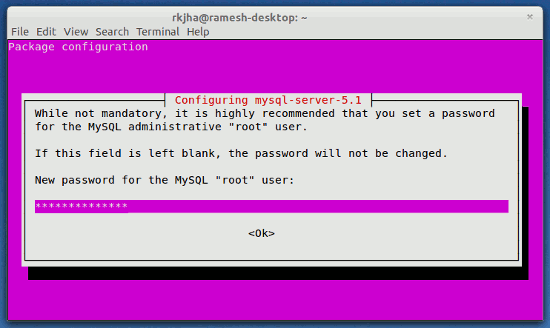
To install Mysql on Ubuntu what you have to  do is type  the following command:

sudo apt-get install mysql-client mysql-server

and then you will see something like this:


What you have to do there is type the  password for the root user.

and that's all.

Good luck!!!!!